Ubuntu
-
ssh: https://ubuntu.com/server/docs/service-openssh
-
找對應的port 的pid:
sudo lsof -i :3000
updrade
lsb_release -a
do-release-upgrade
cmd
- 下載檔案:
curl -L -o {filename} "https://drive.google.com/uc?export=download&id={ID}"
IPFS
- install
- ipfs web gui
- https://explore.ipld.io/
- https://ipfs.github.io/public-gateway-checker/
- check ipfs
rust
mdbook
- https://rust-lang.github.io/mdBook/ .github/workflows/gh-pages.yml
name: github pages

on:
  push:
    branches:
      - main
  pull_request:

jobs:
  deploy:
    runs-on: ubuntu-20.04
    concurrency:
      group: ${{ github.workflow }}-${{ github.ref }}
    steps:
      - uses: actions/checkout@v2

      - name: Setup mdBook
        uses: peaceiris/actions-mdbook@v1
        with:
          mdbook-version: '0.4.10'
          # mdbook-version: 'latest'

      - run: mdbook build

      - name: Deploy
        uses: peaceiris/actions-gh-pages@v3
        if: ${{ github.ref == 'refs/heads/main' }}
        with:
          github_token: ${{ secrets.GITHUB_TOKEN }}
          publish_dir: ./book
golang
Hugo
- cmd
hugo new posts/my-first-post.md
name: GitHub Pages

on:
  push:
    branches:
      - main  # Set a branch to deploy
  pull_request:

jobs:
  deploy:
    runs-on: ubuntu-20.04
    concurrency:
      group: ${{ github.workflow }}-${{ github.ref }}
    steps:
      - uses: actions/checkout@v3
        with:
          submodules: true  # Fetch Hugo themes (true OR recursive)
          fetch-depth: 0    # Fetch all history for .GitInfo and .Lastmod

      - name: Setup Hugo
        uses: peaceiris/actions-hugo@v2
        with:
          hugo-version: '0.91.2'
          # extended: true

      - name: Build
        run: hugo --minify

      - name: Deploy
        uses: peaceiris/actions-gh-pages@v3
        if: ${{ github.ref == 'refs/heads/main' }}
        with:
          github_token: ${{ secrets.GITHUB_TOKEN }}
          publish_dir: ./public
blockchain
替代
- Hashgraph
Application
- cross-chain bridge
- NFT
- https://xp.network/
- NFT
- NFT Ticketing
- POAP(Proof of Attendance Protocol): news1
資源
- 教學性質
- https://www.0x1.academy/: 目前由寶博社群共編使用
問題
- scaling problem
NFT
- 價值:https://www.binance.com/zh-TW/blog/nft/%E5%A6%82%E4%BD%95%E8%A9%95%E4%BC%B0-nft-%E7%9A%84%E5%83%B9%E5%80%BC-421499824684902357
投票
- https://snapshot.org/
空間 私有club
- https://collab.land/
查詢鏈上資料
- https://thegraph.com/
- https://github.com/graphprotocol
實驗室
-
台大共識實驗室
- 老師:廖世偉 (史丹佛大學、前Android研發團隊)
- 已畢業
- 杜若宇:Hooky數位資產錢包(創辦人)
- 陳柏安:投資平台Coinomo(技術長)
- 黃偉軒:數位資產管理平台Steaker(創辦人)
- 余哲安:金融背景
- 學生
-
謝銘鋒 台大資工博士後
-
曲建仲:科技youtuber
-
台大影像處理與多媒體實驗室
- 老師:洪一平
- 已畢業
- 林經堯:聲音藝術
- 葛如鈞:區塊鏈Podcaster
待研究
- https://matters.news/
- liker id
公司
台灣
- MaiCoin
- Qubic Creator: NFT平台
Tezos
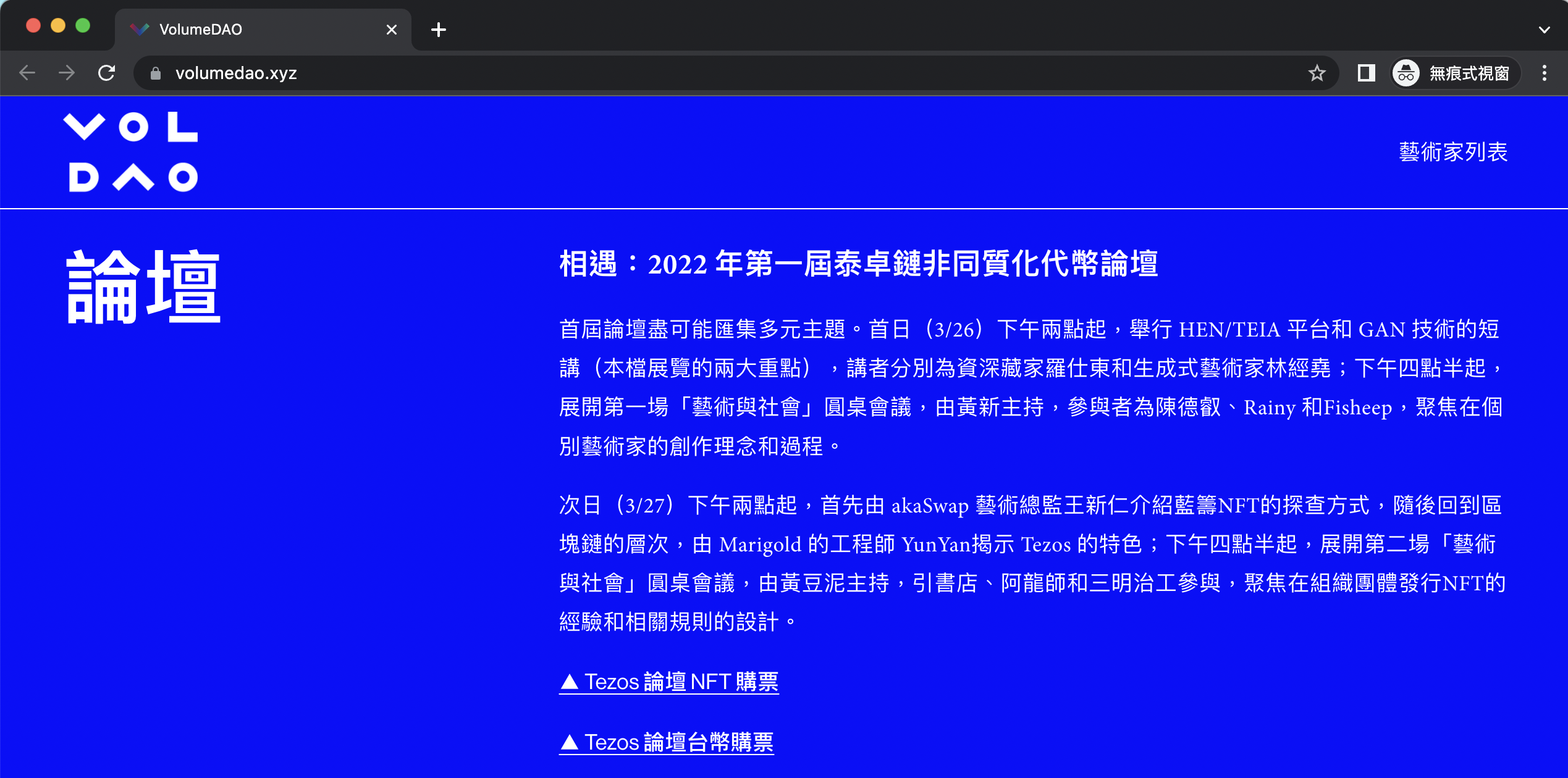
- Marigold: 致力開發tezos底層技術的公司
- 郗昀彥 Yun-Yan Chi: formal verification
DAO
NFT
artist
- 黃新 Huang Hsing (紐耶羅)
- 黃彥霖 (黃豆泥)
- 王新仁 (阿亂) tezdozen 演算藝術家
- [川貝母] tezdozen 插畫家
cosmos
- Blockchain EXplorer: https://mapofzones.com/
matic, BSC, terra
Cosmos
- https://cosmos.network/
- Developer Portal
- ecosystem
- learn golang
Tools
- Cosmos SDK: A framework for building public blockchains.
- Tendermint Core: Blockchain consensus engine and application interface. link doc
- Ignite CLI: All-in-one platform to build, launch, and maintain apps on a sovereign and secured blockchain. link doc
- IBC: Industry standard protocol for inter-blockchain communication. link doc
- CosmWasm: Smart contracting platform built for Cosmos ecosystem. link doc
- Cosmos Hub: Software powering Cosmos Hub, the heart of the Cosmos network, and home of the ATOM token. doc
wallet
公司
- blocto: 多簽錢包,免gas fee,跨鏈橋(幣、NFT(under dev))
NFT
Cloud Native
- Cloud Native Computing Foundation (CNCF)
- Kubernetes、Prometheus、Helm、Envoy、gRPC。
- development
- Kubernetes, Docker, serverless functions, APIs, and Kafka
evolution
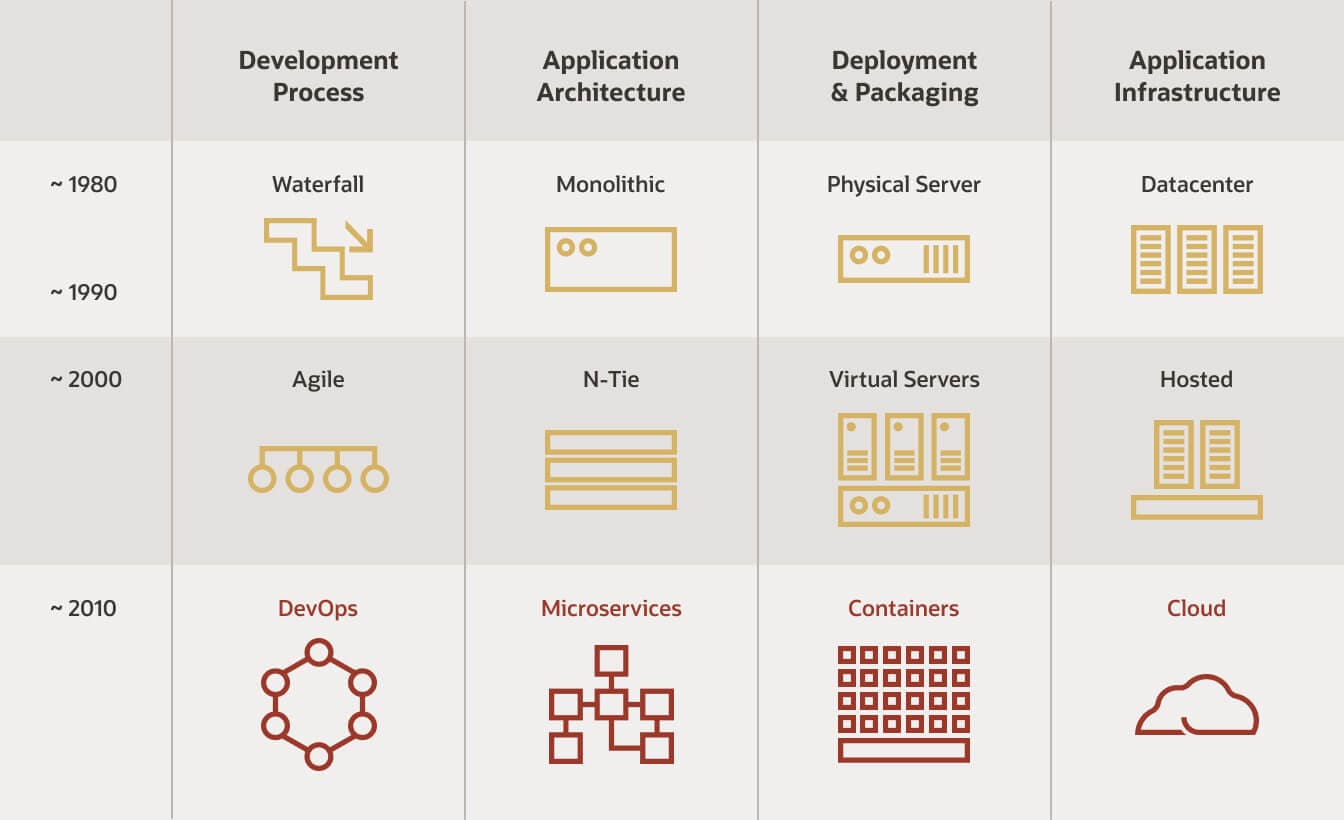 from : https://www.oracle.com/cloud/cloud-native/what-is-cloud-native/
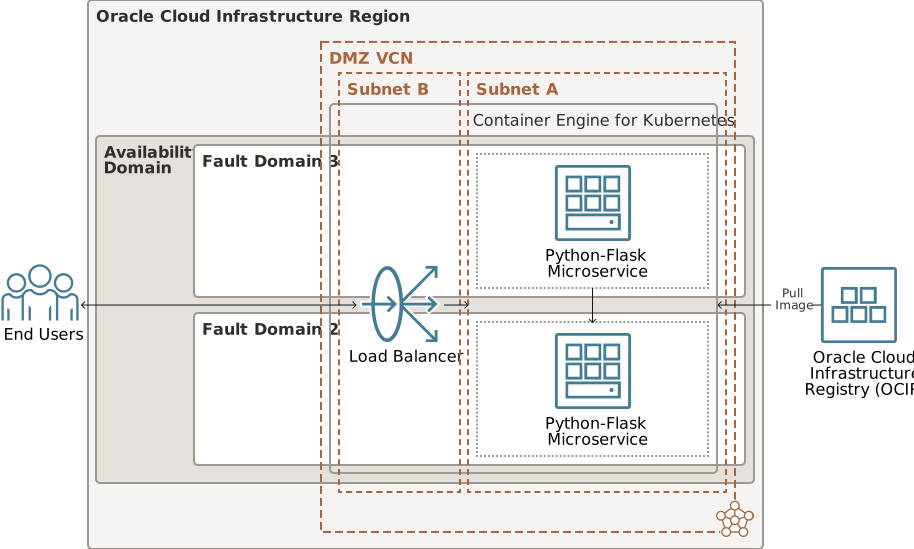 from: https://docs.oracle.com/en/solutions/deploy-microservices/index.html#GUID-3BB86E87-11C6-4DF1-8CA9-1FD385A9B9E9
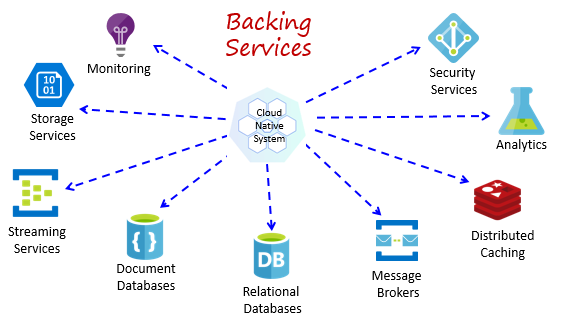 from: https://docs.microsoft.com/en-us/dotnet/architecture/cloud-native/definition
example
- MUShop: CN Apps教學
參考
- Developing Cloud-Native Applications with Microservices Architectures
- Introduction to cloud-native applications
Kubernetes
docker
- https://docs.docker.com/engine/install/ubuntu/#installation-methods
minikube
minikube is local Kubernetes, focusing on making it easy to learn and develop for Kubernetes.
minikube start
alias kubectl="minikube kubectl --"
kubectl proxy --address='0.0.0.0' --port=8002 --accept-hosts='^*$'
Starting to serve on [::]:8002
http://192.168.0.171:8002/api/v1/namespaces/kubernetes-dashboard/services/http:kubernetes-dashboard:/proxy/#/pod?namespace=default
FAQ 遇到 Exiting due to DRV_NOT_HEALTHY: Found driver(s) but none were healthy. See above for suggestions how to fix installed drivers.
sudo usermod -aG docker $USER && newgrp docker
k8s
- create namespace:
kubectl create ns {name} - create deployment :
kubectl {namespace} {create/apply} -f manifests/{service_name}- example:
kubectl -n{name} apply -f manifests/manifests/swagger.yaml
- example:
- get service:
kubectl -n{name} get service
deploy a service
-
write a yaml file to create a deployment.
-
create deploment:
kubectl {namespace} create -f manifests/{service_name} -
checking pod status:
kubectl -n{name} get pod -
checkout node:
kuberctl get node -
find a node and find hostname:
kubectl describe node {nodeid} | grep hostname -
go to [K8S dev], select Load Balancer product, paste the hostname and port predefined on the yaml file.
-
make sure your load balancer is running and ipv4 is up
-
checkout vip
-
go to [K8S dev] select DNS product, create a record with the vip
# Deployment
---
apiVersion: apps/v1
kind: Deployment
metadata:
  name: swagger-tools
spec:
  replicas: 1
  selector:
    matchLabels:
      app.kubernetes.io/name: swagger-tools
  template:
    metadata:
      labels:
        app.kubernetes.io/name: swagger-tools
    spec:
      containers:
      - name: swagger-tools
        image: swaggerapi/swagger-editor
        imagePullPolicy: Always
        env:
        - name: NAME
          value: noname
        ports:
        - name: http
          containerPort: 8080
          protocol: TCP
        readinessProbe:
          failureThreshold: 3
          httpGet:
            path: /
            port: http
            scheme: HTTP
          initialDelaySeconds: 10
          periodSeconds: 2
          successThreshold: 1
          timeoutSeconds: 1
        livenessProbe:
          failureThreshold: 3
          httpGet:
            path: /
            port: http
            scheme: HTTP
          initialDelaySeconds: 10
          periodSeconds: 2
          successThreshold: 1
          timeoutSeconds: 1
        resources:
          requests:
            cpu: 10m
            memory: 16Mi
          limits:
            cpu: 300m
            memory: 384Mi
# Service
---
apiVersion: v1
kind: Service
metadata:
  name: swagger-tools
  labels:
    app.kubernetes.io/name: swagger-tools
spec:
  type: NodePort
  selector:
    app.kubernetes.io/name: swagger-tools
  ports:
  - name: http
    port: 80
    nodePort: 30138
    protocol: TCP
    targetPort: http
Code Quality
-
SonarQube
- https://en.wikipedia.org/wiki/SonarQube
-
refactor
javascript
架構
- JS
- JS engines
- purpose
- web browser
- server
- application
- example
- V8(google)、JavascriptCore(apple)、SpiderMonkey(Mozilla)
- runtime env
- NodeJS
- Deno
- purpose
- browser engines
- webkit
- JS engines
- WebAssembly
chakra
- https://chakra-templates.dev/
Code Quality
-
SonarQube
- https://en.wikipedia.org/wiki/SonarQube
-
refactor
cmd
DS
- Linked List
- Tree & Graphs
- Stack & Queues
- Heaps
- Vectors / ArrayLists
- Hash Table
ALG
- BFS
- DFS
- BS
- M sort
- Q sort
security
- https://rekt.news/
DevOps
https://hackmd.io/iqMrf0wKTOSLbXfU0ylz3w
resources
Backend
prisma
- https://www.prisma.io/docs/getting-started/quickstart
- https://github.com/prisma/prisma-examples